Alarms That Actually Ring
Built on Apple’s AlarmKit, Sunvior alarms sound even when your iPhone is locked, on silent, or in Focus. Tap Stop and your affirmation is waiting.
Features
Sunvior pairs alarms that actually ring with a fresh affirmation every day, a gentle one-minute morning ritual, and a warm design that works by day and night.
Download on the App Store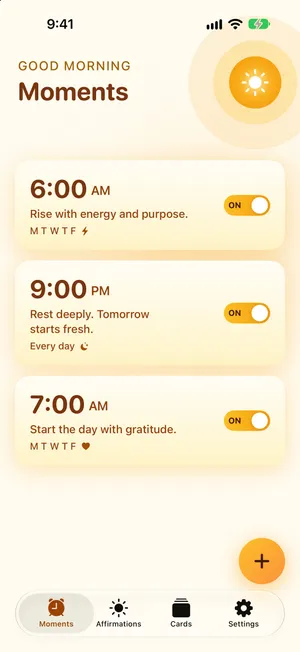
Built on Apple’s AlarmKit, Sunvior alarms sound even when your iPhone is locked, on silent, or in Focus. Tap Stop and your affirmation is waiting.
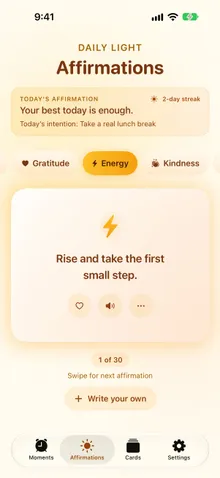
180 short, believable affirmations across six free categories, matched to the time of your alarm, with a new pick each day.
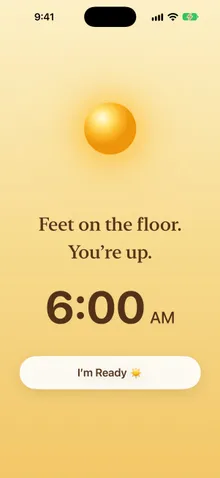
Sound and light fade in softly. Then take one slow breath, say your affirmation out loud, and set one intention for the day.
Hear your affirmation in the most natural voice on your iPhone, or in your own voice with Personal Voice.
Write affirmations in your own words, keep favorites close, and hide any line you’d rather not see again.
A gentle streak and today’s intention keep you coming back. Miss a day and it quietly starts again.
See today’s affirmation, your streak, and your intention at a glance, without opening the app.
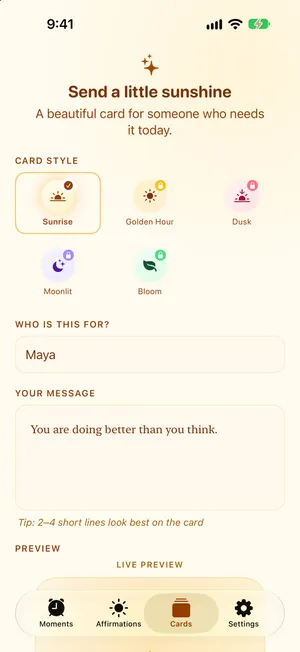
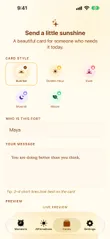
Design an affirmation card for someone you love and share it as a beautiful image.
Sunrise tones in light mode, a warm cocoa dark mode for early mornings, and text that grows with your iPhone’s text size.
Feature preview
Alarms, affirmations, and cards in a warm, uncluttered design that’s easy to use half-awake.
Visual walkthrough
Sunvior keeps the experience simple: set an alarm, wake up to a fresh affirmation, and take one calm minute before the day begins.
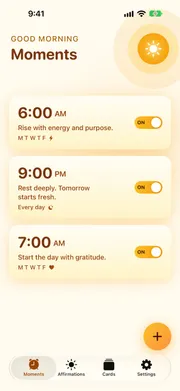
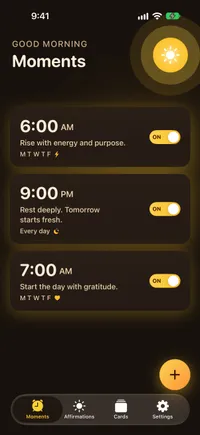
Schedule alarms with repeat days and a short message. They sound even when your iPhone is locked or on silent.
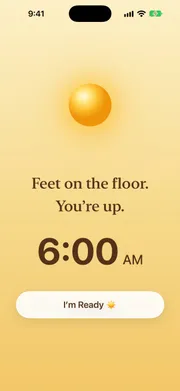
When the alarm ends, your affirmation is the first thing you see, and it can be read aloud in a natural voice.
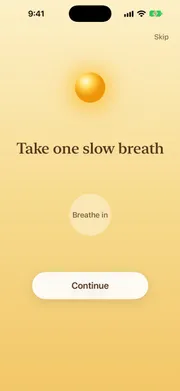
One slow breath, your affirmation out loud, and an intention for the day. Skip it anytime.
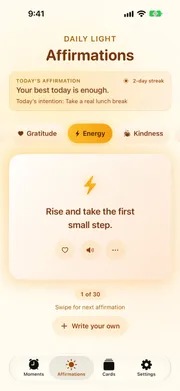
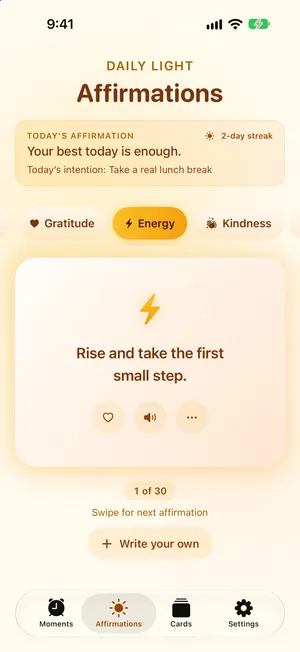
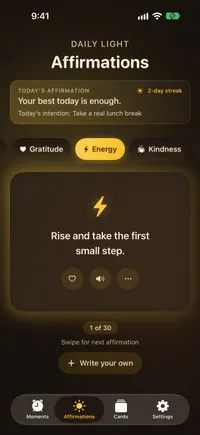
Browse by category, save favorites, hear any line read aloud, or write your own.
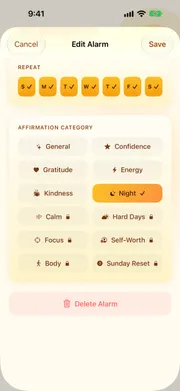
Each alarm gets the right kind of affirmation: energy in the morning, gratitude in the evening, calm before bed.
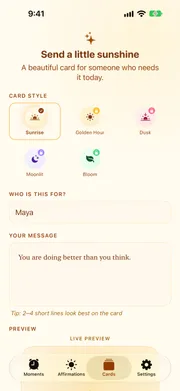
Design an affirmation card for someone you love and share it as an image.
Morning ritual
When your alarm ends, Sunvior guides you through a short ritual: wake gently as sound and light fade in, take one slow breath, say your affirmation out loud, and set one intention. Your streak grows each morning, and a missed day quietly starts it again.
1. Wake gently
2. Breathe

3. Say it
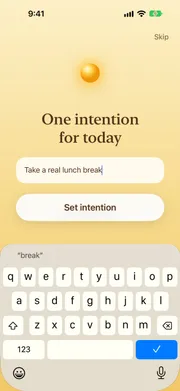
4. Set an intention
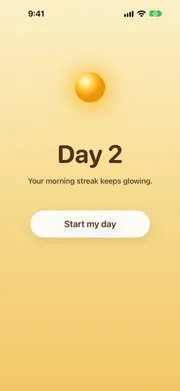
5. Keep the streak
Light and dark
In light mode, Sunvior glows like a sunrise. In dark mode it shifts to deep brown and cocoa with cream text, so an early alarm never feels harsh.
Every screen is designed for readable contrast, and text grows with your iPhone’s text size setting.
Free and Premium
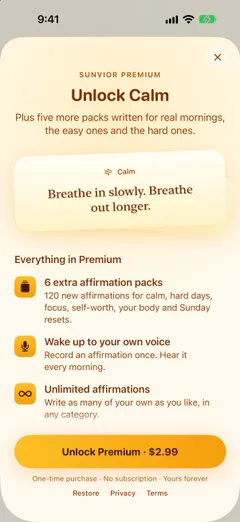
Sunvior Premium is an optional one-time purchase, with no subscription, for when you want more.
Sunvior is not just a quote library or a standard alarm. Its strongest feature is intent: pairing reliable alarms with meaningful, daily affirmations.
Use it to wake up, to reset in the afternoon, to wind down at night, or to send a warm card that brings sunshine to someone else’s morning.
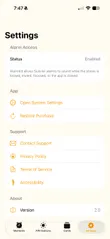
Sunvior integrates with iOS's native AlarmKit system. Alarms remain enabled and sound reliably even when your iPhone is set to Silent mode, Focus modes are active, or if you close the app.
Create a custom card in the app, preview its warm style, and share it immediately with a friend via iMessage or save it to your camera roll as a beautiful image.

Pair reliable alarms with meaningful affirmations and wake up to a better morning.
Download on the App StoreWays to use Sunvior
Sunvior is designed to be a flexible tool for your daily routine. Here are a few ways our community uses the app.
Schedule morning affirmations or midday confidence prompts. Receive supportive words exactly when you usually need them most, helping reframe negative thoughts.
Start with one slow breath before the day begins, and reach for the Calm or Hard Days packs when you need a softer word.
Turn simple habits into daily routines. Set gentle alarms to drink water, take a walk, or pause for gratitude, each with an affirmation that fits the time of day.
Sunvior uses Apple’s AlarmKit, so alarms sound even when your iPhone is locked, on silent, in Focus, or the app is closed. When you tap Stop, Sunvior opens to that morning’s affirmation.
Sunvior includes 180 hand-written affirmations across six free categories: General, Confidence, Gratitude, Energy, Kindness, and Night. Each alarm gets a fresh pick every day, matched to the time it rings. You can also write your own.
Yes. Sunvior can read your affirmation when the alarm ends, using the most natural voice installed on your iPhone. You can pick a different voice, download free Premium voices from iOS Settings, or use your own Personal Voice.
Alarms, all six core categories, the morning ritual, streaks, read aloud, favorites, the widget, and up to three of your own affirmations are free. Sunvior Premium is a one-time purchase that adds six extra affirmation packs, unlimited custom affirmations, a voice alarm in your own recorded voice, and every widget and card theme.
Yes. Create a card for someone, preview it in a warm style, and share it as an image. Premium adds four more card styles and saving straight to Photos.